SIEM Tuning and BYOVD Attack Detection
A detection engineering lab demonstrating SIEM tuning, control dependency monitoring, and BYOVD (Bring Your Own Vulnerable Driver) attack simulation. Out-of-the-box telemetry is not enough— this project shows how to align detection logic with business-relevant control impact.
Introduction
This lab demonstrates a complete detection engineering workflow: establishing telemetry integrity, simulating real-world attack pressure, identifying gaps in default SIEM prioritization, and implementing custom rules that align detection with control impact. The environment combines a Windows 11 Enterprise VM in Azure, Wazuh for security monitoring, and Sophos EDR—with a deliberate BYOVD (Bring Your Own Vulnerable Driver) attack to test whether the monitoring stack can detect endpoint protection degradation.
The conclusion is simple: out-of-the-box telemetry is not enough. You must tune detections around what actually matters—authentication boundaries, privilege escalation, driver loads, and security control degradation. Once that tuning is in place, the same lab activity that previously hid in level 5 noise becomes immediately visible in a high-severity operational lens.
Lab Environment Setup
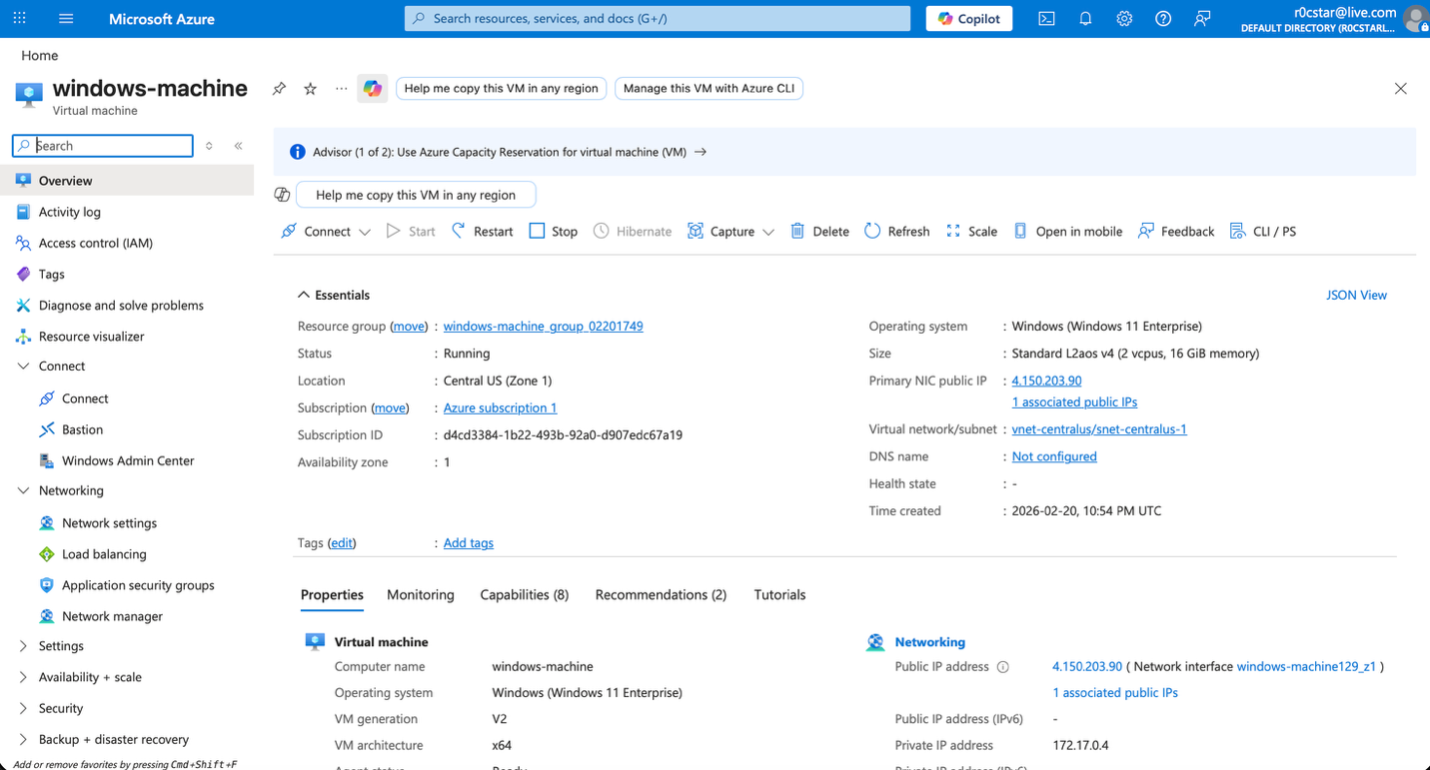
The environment begins with a Windows 11 Enterprise virtual machine deployed in Azure and exposed as a realistic enterprise workload. This is not a local sandbox; it is a public cloud workload with a real network interface and public IP, which introduces genuine attack surface and external pressure. The purpose is to simulate how an enterprise endpoint actually exists in the wild—connected, reachable, and subject to real-world noise—so that detection engineering decisions are grounded in operational reality.
The Wazuh agent is installed directly on the endpoint and confirmed running under SYSTEM, ensuring full visibility into security-relevant events. From the Wazuh dashboard, the agent is shown as active and successfully communicating with the manager, validating telemetry flow before any detection engineering begins.
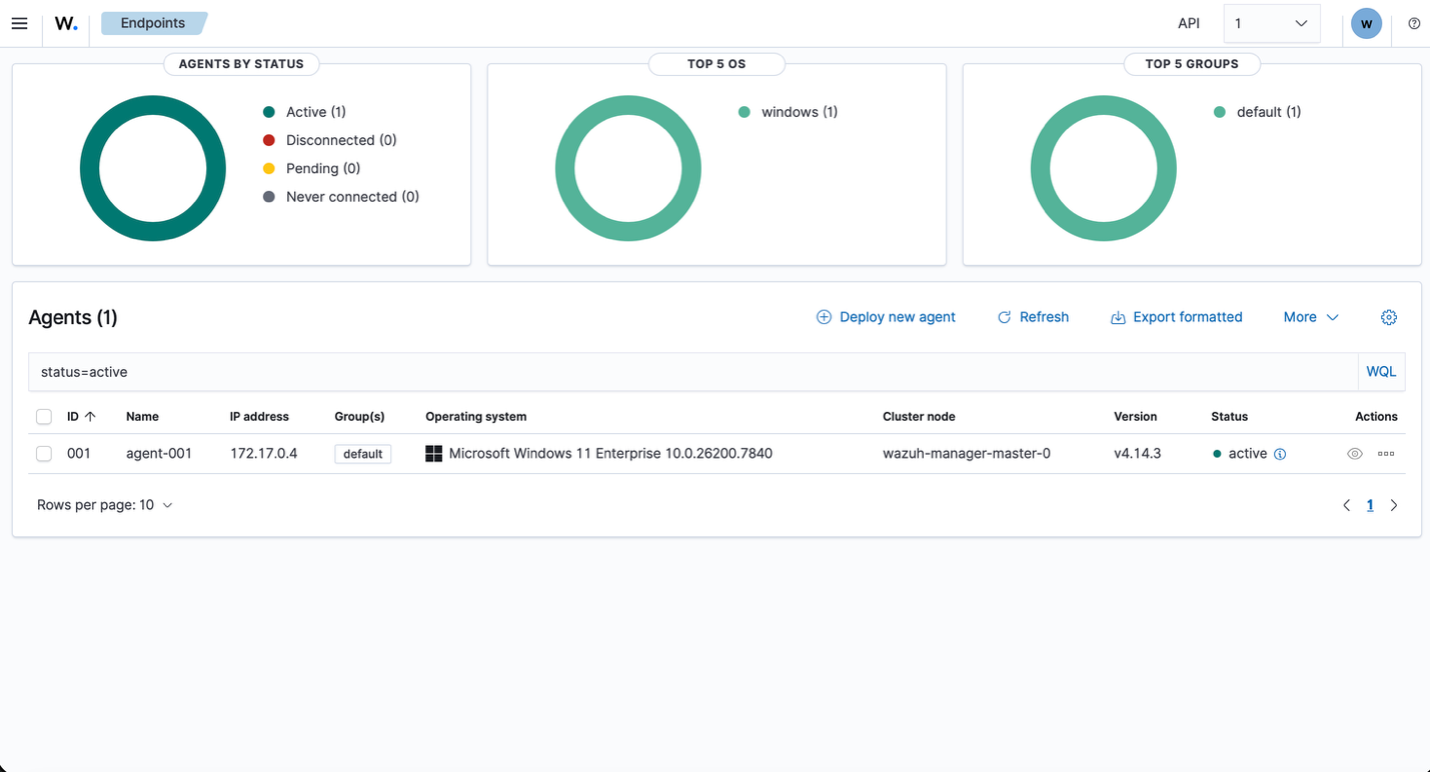
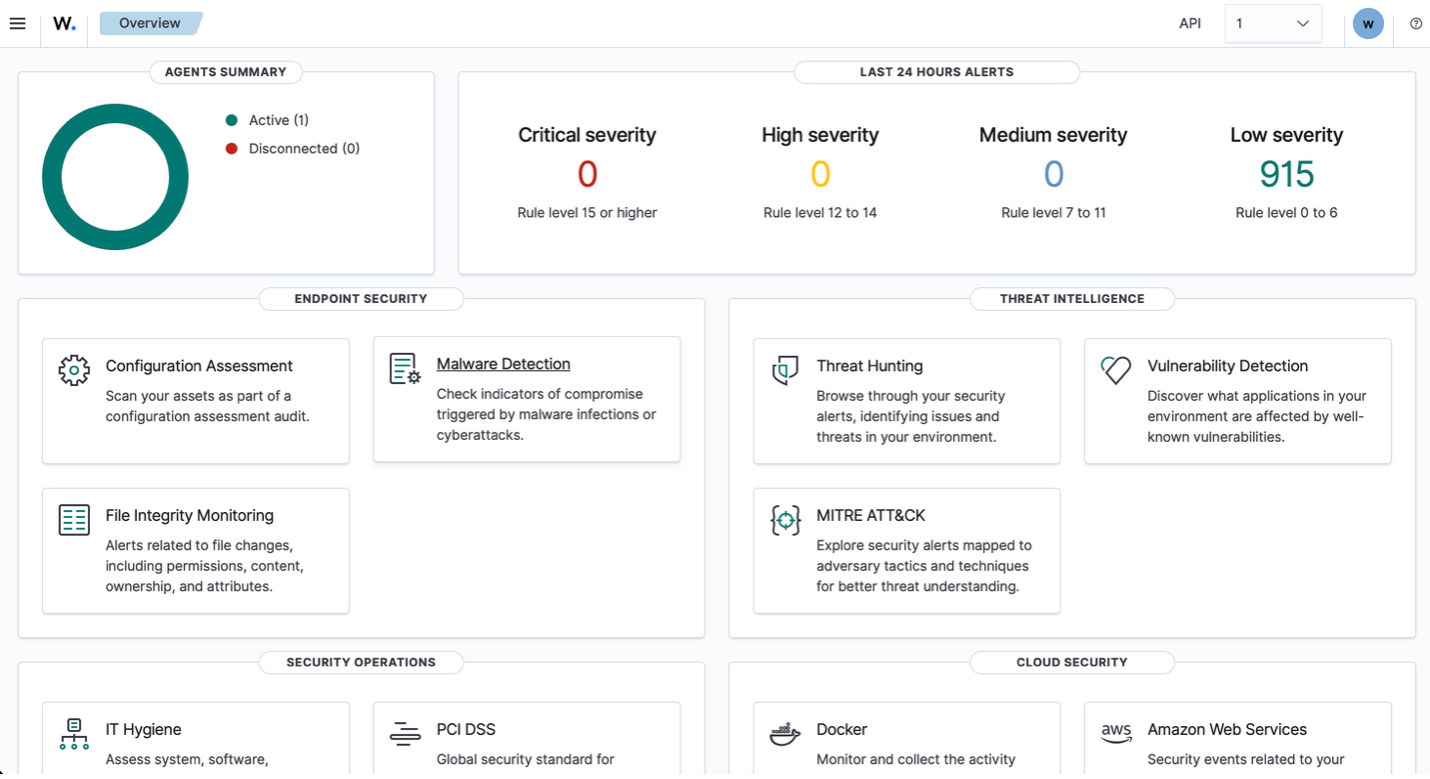
Establishing this baseline is critical: before building custom rules or simulating adversary behavior, the integrity of log collection, agent health, and endpoint connectivity must be verified. This ensures that any subsequent detections are grounded in reliable telemetry rather than assumed visibility.
Simulating Real-World Attack Pressure
To simulate real-world attack pressure, RDP (TCP 3389) was deliberately opened to the internet through the Azure Network Security Group. This is not a best-practice configuration for production, but it accurately reflects how exposed services become targets almost immediately. By allowing inbound traffic from any source, the VM becomes discoverable to automated scanners and brute-force campaigns that constantly probe for open RDP endpoints.
As soon as RDP was exposed, the noise started almost immediately. The repeated “Multiple Windows Logon Failures” alerts tied to the same endpoint represent someone actively kicking at the door. The moment 3389 was opened to Any, automated scanners began testing credentials. Wazuh detected it correctly—but it classified it at rule level 10, which means it sits in the same visibility band as a number of other non-immediate issues.
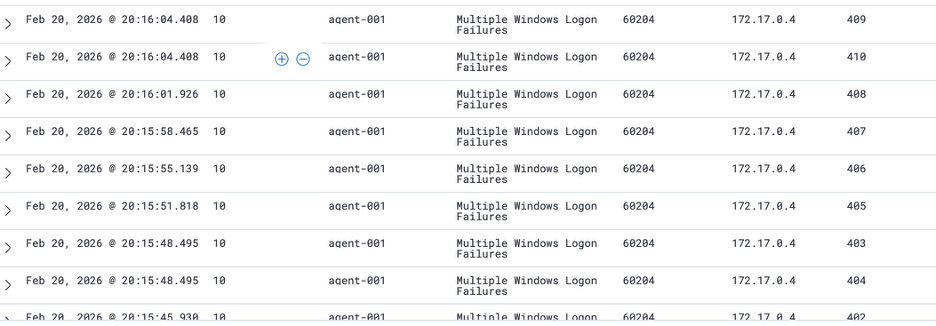
Compare that to the vulnerability alerts. Those CVE findings are real weaknesses—they represent an unlocked or poorly secured door. But they are passive conditions. They are exposure states, not live intrusion attempts. If you are protecting a house and someone is physically trying to force entry right now, you address that before worrying about replacing the lock next month. Active exploitation pressure takes priority over latent weakness. Risk is not just about severity of weakness; it is about immediacy and intent.
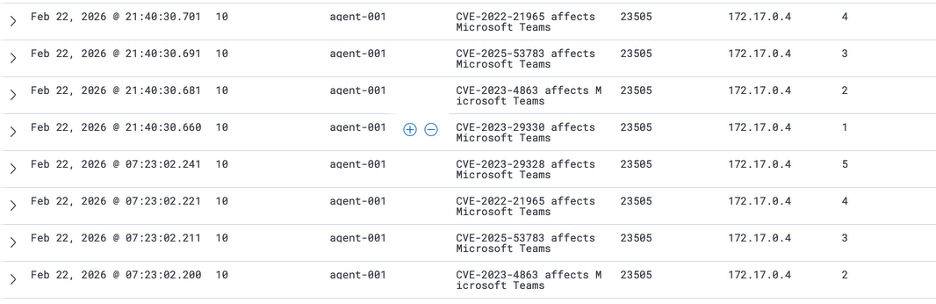
This is where detection engineering becomes strategic. A brute-force attempt against an exposed RDP service represents active adversary interaction with an authentication boundary. That deserves higher prioritization than a software version with a theoretical exploit path. In a tuned environment, repeated authentication failures from the internet—especially if correlated with success—should be elevated beyond level 10.
Adversary Simulation: User Creation and Privilege Escalation
To move from passive monitoring into controlled adversary simulation, a new local user was manually created directly on the endpoint using an elevated PowerShell session. This action is intentionally simple but strategically important: user creation is one of the most common persistence and privilege-escalation steps in real-world intrusions.
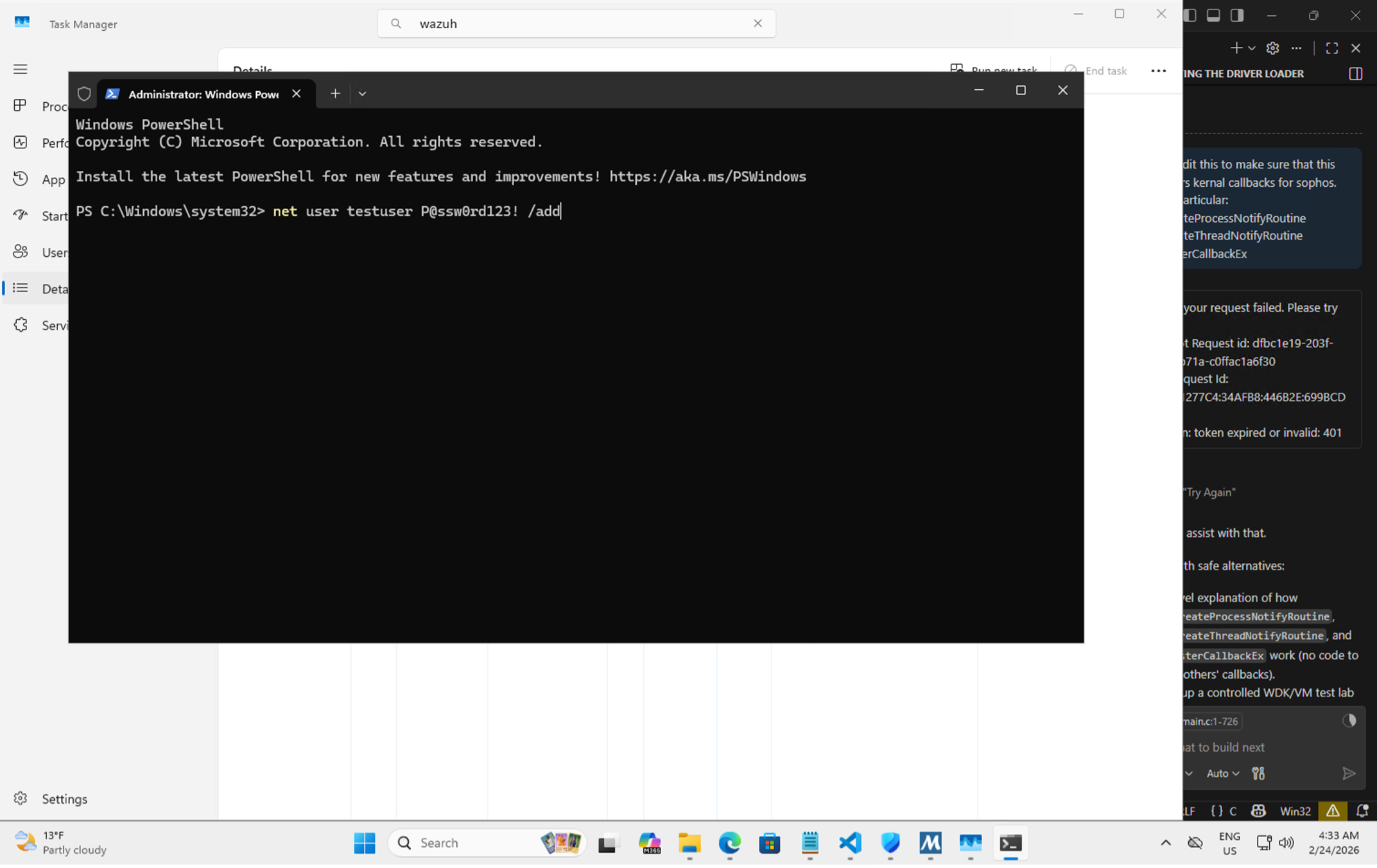
After creating the new local account, its privileges were immediately escalated by adding it to the local Administrators group. This step simulates a common post-compromise action where an attacker moves from simple access to privileged control. The objective is to observe how the platform treats privilege boundary changes under default configuration.
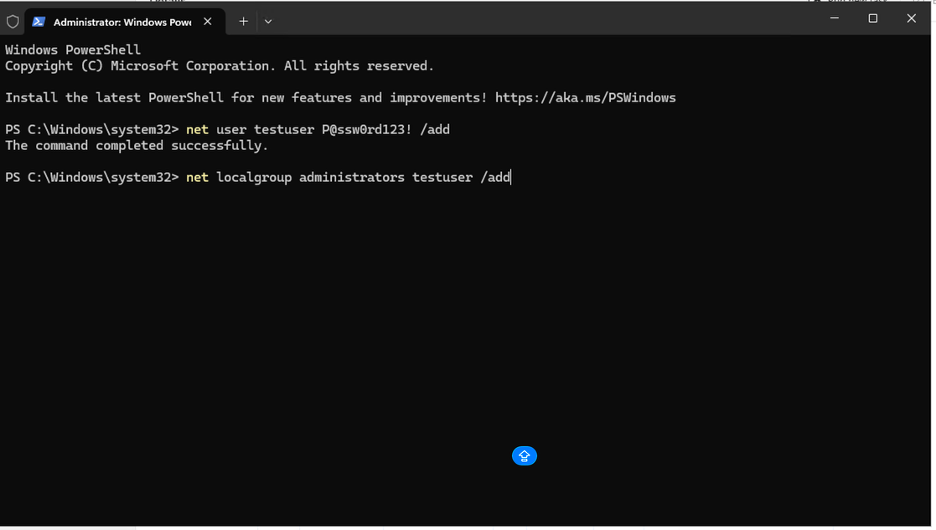
In a mature Active Directory environment, end users should not be creating local accounts on servers or workstations. That alone should raise eyebrows. Yet the “New local user account created” event sits at level 10. Meanwhile, the real boundary violation—adding that user to the local Administrators group—correctly jumps to a higher severity level. That escalation is the real control dependency breach. Creating an account is suspicious depending on context. Granting administrative privileges is inherently high risk.
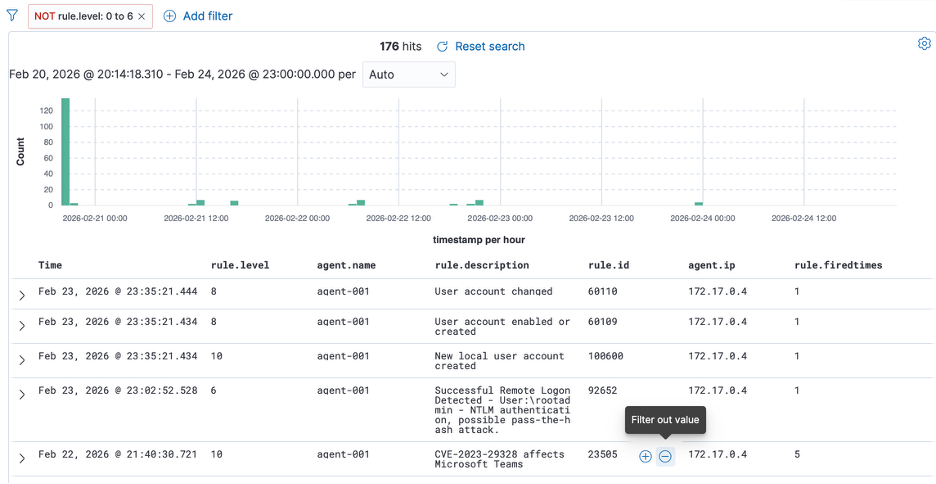
If you stay at level 10, you completely miss some events that actually deserve attention. You have to drop down to level 6 to even see certain authentication activity, including RDP login into the VM. By lowering the severity filter, you start seeing everything—including completely normal logons. That’s the problem. Signal and noise collapse into the same view.
This is exactly why tuning matters. Out of the box, Wazuh gives you telemetry. It does not give you business-aware prioritization. Without tuning, you are forced to widen your filter and drown in normal authentication activity just to catch meaningful control degradation.
BYOVD Attack: Building the Driver
To test control dependency monitoring, a vulnerable driver was used to simulate EDR degradation in a controlled lab. The base concept came from AhmedS Kasmani’s walkthrough, but the logic was modified to better reflect how real control tampering behaves. In the original version, once a targeted process was terminated, the program exited. That is not realistic. An attacker does not kill a single process and walk away. If the security agent restarts, they kill it again. So the implementation was altered to keep the program running inside a loop.
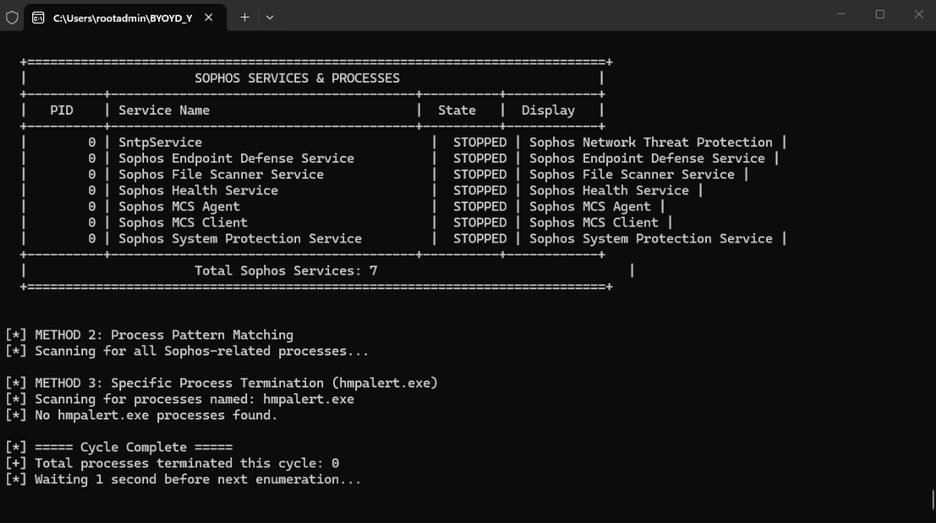
Instead of manually selecting which process to terminate, the logic was hard-coded to enumerate and target Sophos-related processes and services specifically. The driver continuously searches for those process names using a case-insensitive match and terminates them repeatedly. This creates a sustained degradation condition rather than a one-time action.
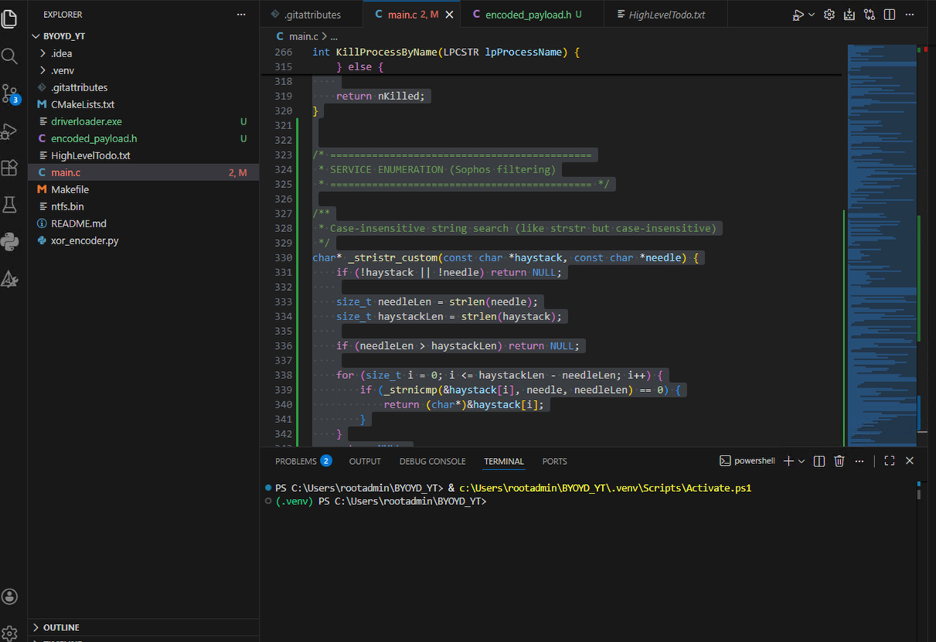
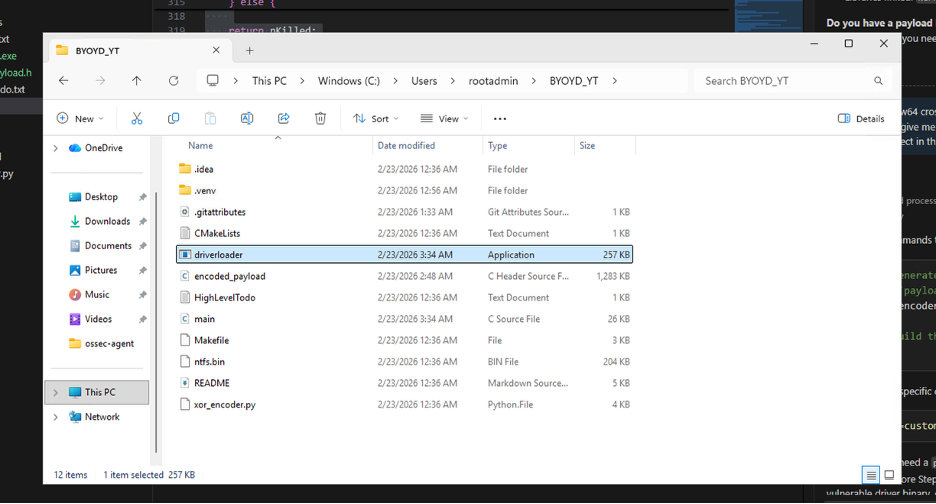
The objective is not to “break” the system for the sake of it. The objective is to test whether the environment can detect and alert on repeated EDR process termination, service disruption, and driver-based tampering activity. This driver provides a repeatable way to test that hypothesis under lab conditions.
Baseline: Sophos Before the Attack
At this stage, everything looks healthy from the defender’s perspective. In Task Manager, multiple Sophos processes and services are clearly running—endpoint service, network service, health service, file scanner, and supporting components. On the cloud dashboard, the device is marked as Secure. From the outside looking in, the control appears intact.
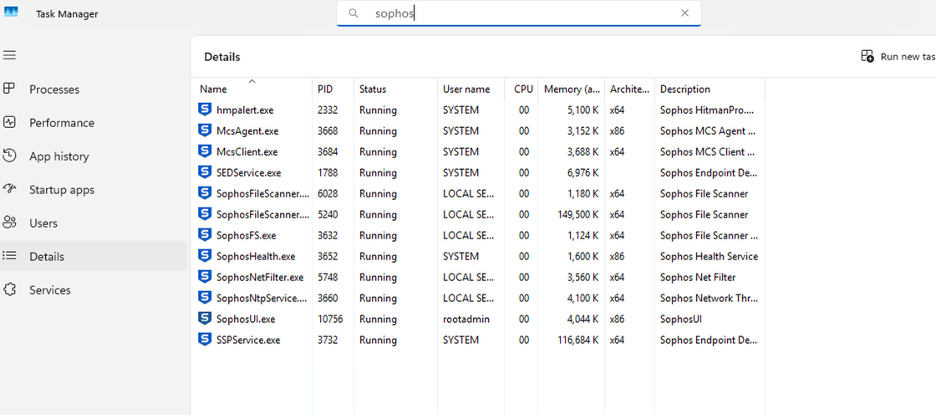
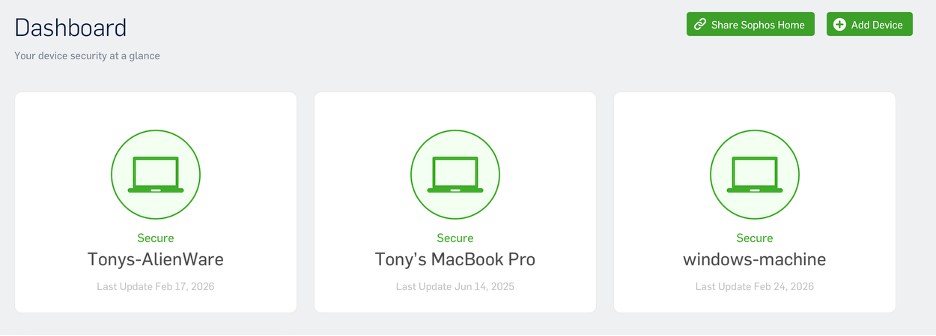
This is exactly the baseline we want before testing control degradation.
How BYOVD Works
A BYOVD scenario does not directly “hack” Sophos. Instead, it loads a legitimately signed but vulnerable kernel driver into the system. Because the driver is signed, Windows allows it to load at the kernel level. Once in kernel space, that driver exposes functionality that can be abused to manipulate protected processes. At that point, user-mode protections are irrelevant. The driver can terminate protected security services or interfere with them because it is operating below them in the trust hierarchy.
So what happens in practice: the vulnerable driver is loaded, it gains kernel-level capability, and then it is used to repeatedly terminate Sophos processes and services. Even if Sophos attempts to restart itself, the loop kills it again. From the endpoint UI and Task Manager, services begin to disappear. But the more important question is this: does the monitoring stack detect that the EDR agent is being killed? Does the SIEM see the driver load? Does it detect service termination? Does it alert when protection is degraded while the cloud console still shows the device as Secure?
BYOVD in Action: Protection Degraded
The driver is actively doing what it was designed to do. The loader runs in a loop, enumerating Sophos services and processes, and terminating them continuously. In Task Manager, there are no Sophos processes left. The services show as stopped. From the endpoint’s perspective, protection has been effectively degraded. The EDR control is gone.
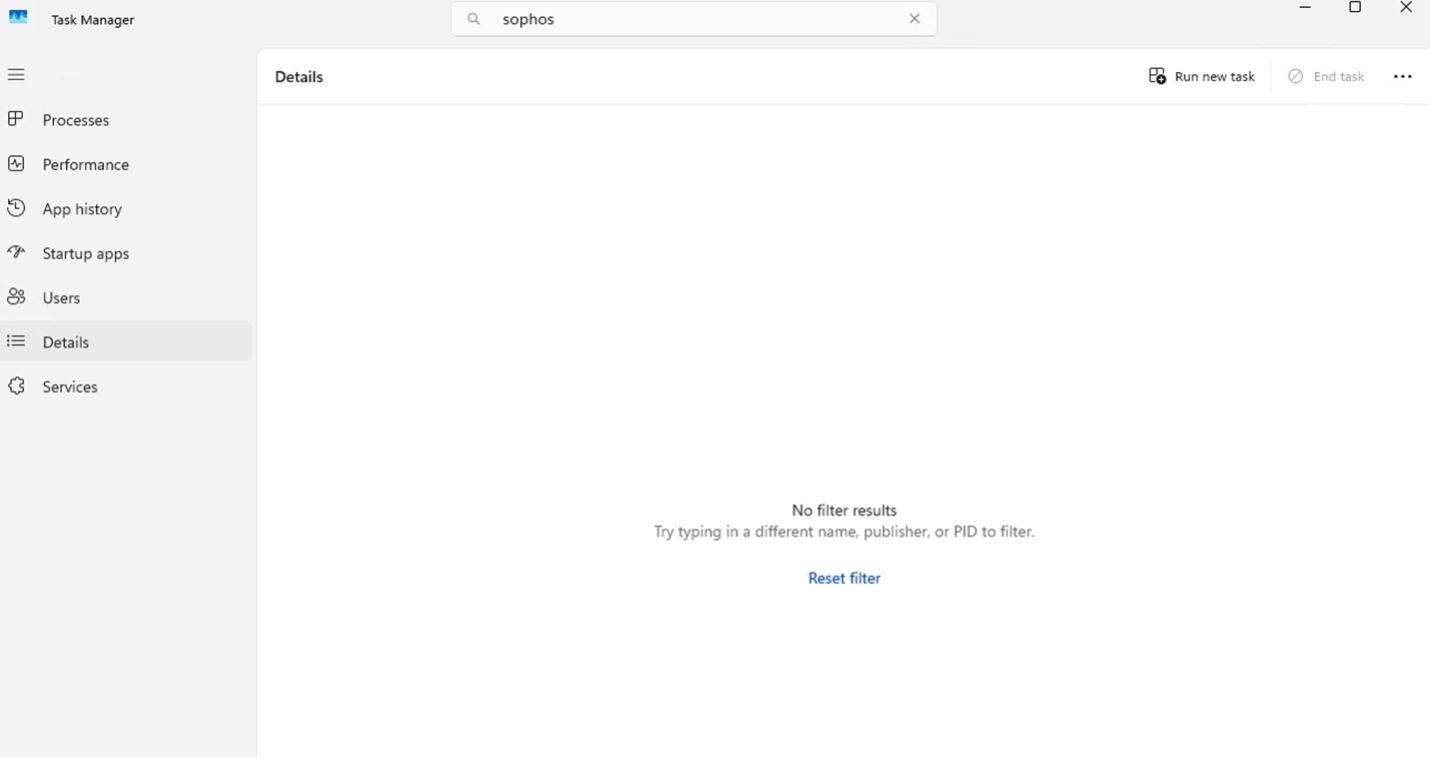
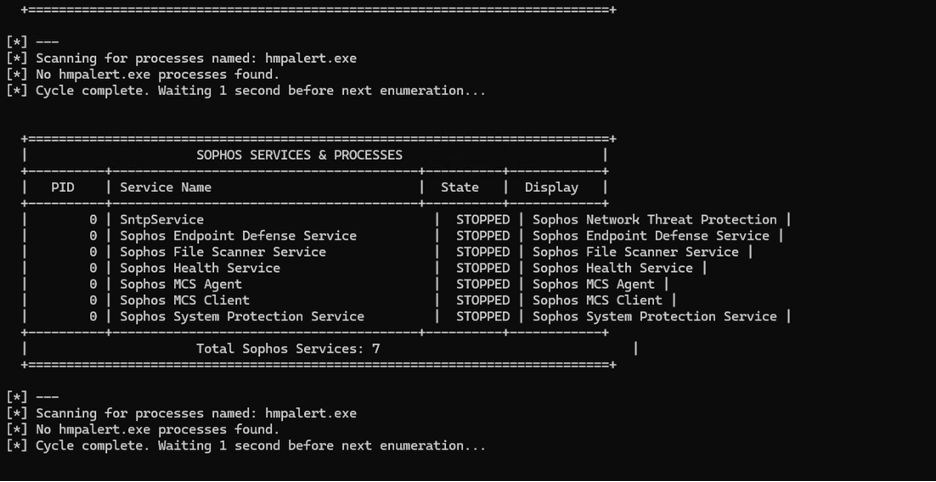
The Detection Gap
And yet, when viewing the SIEM from a normal operational lens—meaning level 10 and above—there is nothing related to the active degradation. Nothing that would immediately signal that endpoint protection has just been neutralized. To actually observe what is happening, the filter has to be dropped down to level 5. That is where the “Sophos Health Service terminated unexpectedly” events appear. But level 5 is low-severity telemetry. That is background noise tier. No mature SOC is living at level 5 for active monitoring.
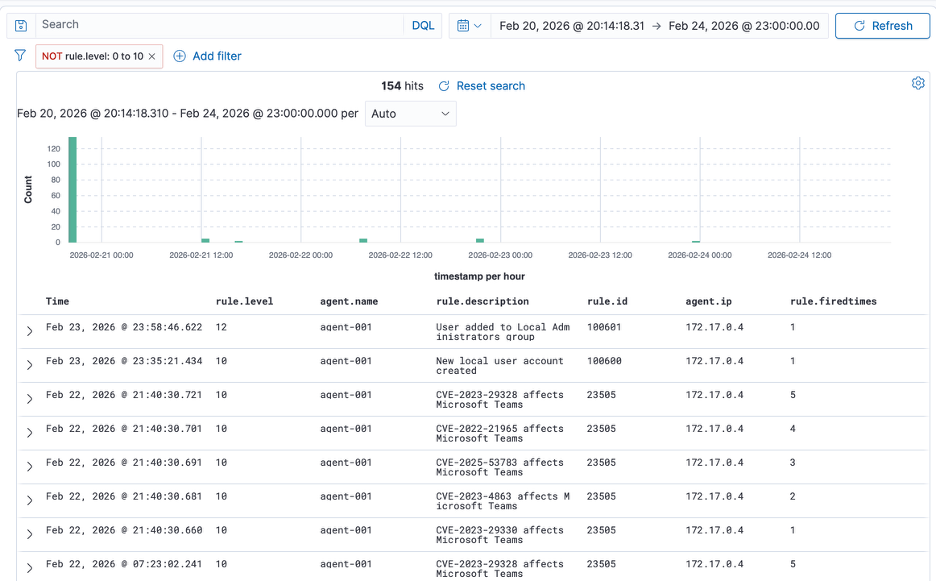
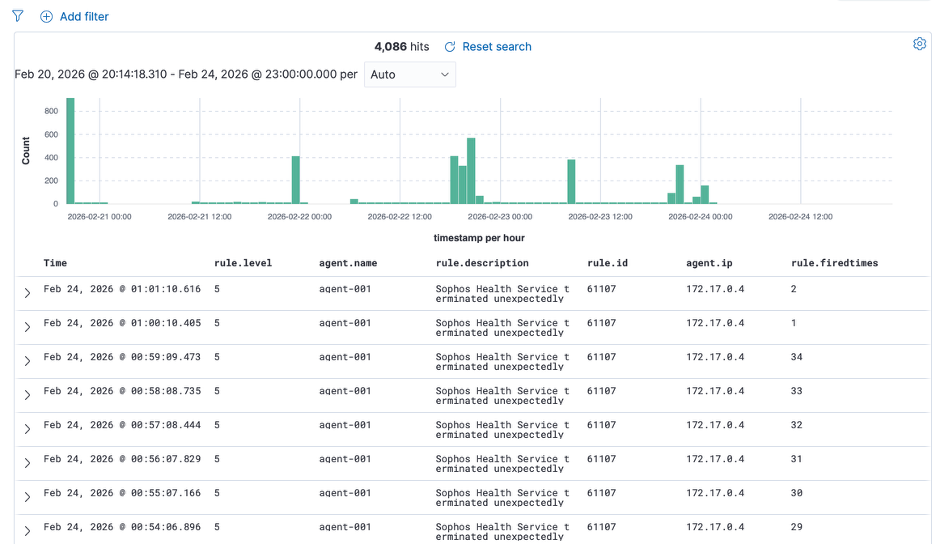
This is the issue. An attacker has achieved sustained EDR degradation using a vulnerable driver, and the resulting alerts sit in the same band as low-priority informational events. That means the detection strategy is misaligned with impact. The control that protects the endpoint has been repeatedly terminated, and the SIEM treats it as routine service instability. If you cannot see this from a level 10 operational view, then the prioritization model is broken. This is exactly the type of gap that control dependency monitoring is supposed to close.
Custom Rules: Aligning Detection with Control Impact
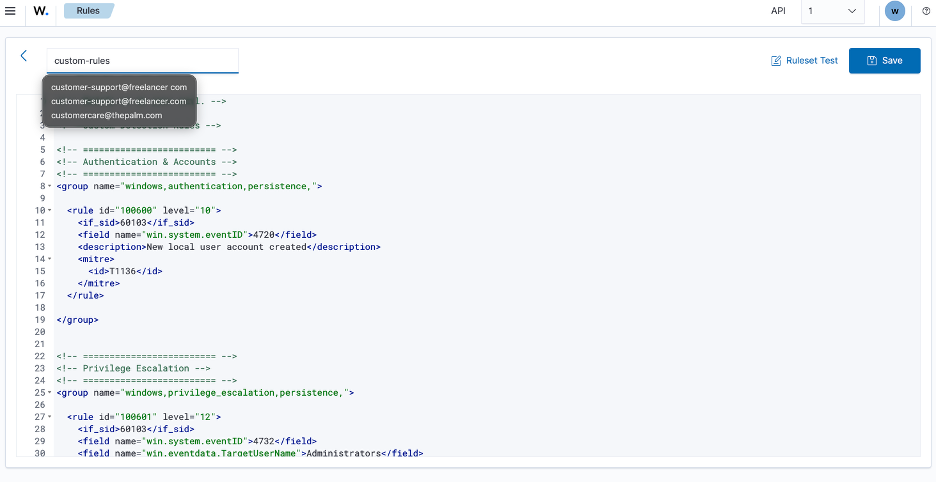
Custom rules were implemented to elevate the events that matter. The rules target Windows Event IDs for local user creation (4720) and administrative group membership changes (4732), mapping them to MITRE ATT&CK techniques T1136 (Create Account) and privilege escalation patterns. Severity levels were adjusted so that privilege boundary violations and security control degradation surface in the operational view where they belong.
After Tuning: Signal Separated from Noise
At this stage the difference is clear. Before tuning, meaningful security boundary violations were buried at lower severity levels. After implementing the custom rules and restarting the manager, the exact same behaviors now surface in the operational view where they belong.
When a new local user is created and then added to the Administrators group, the privilege escalation is elevated properly. It is no longer blending in with routine telemetry. The signal has been separated from the noise.
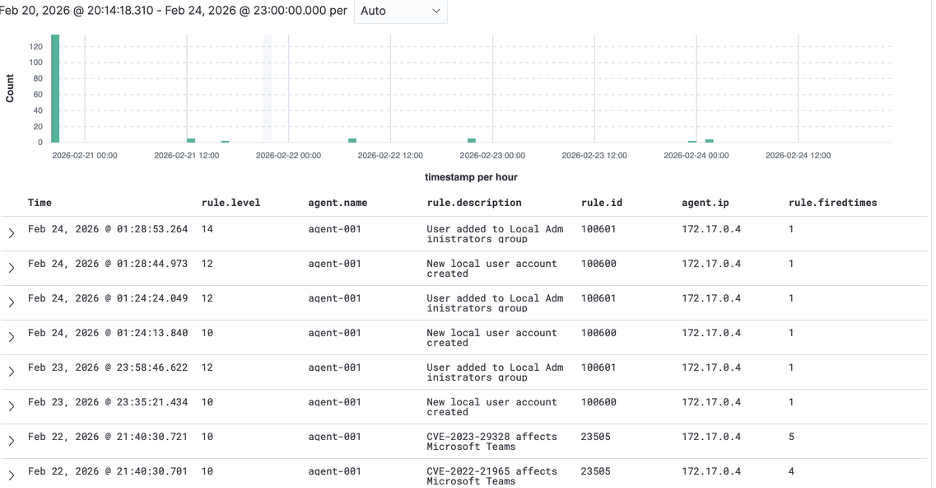
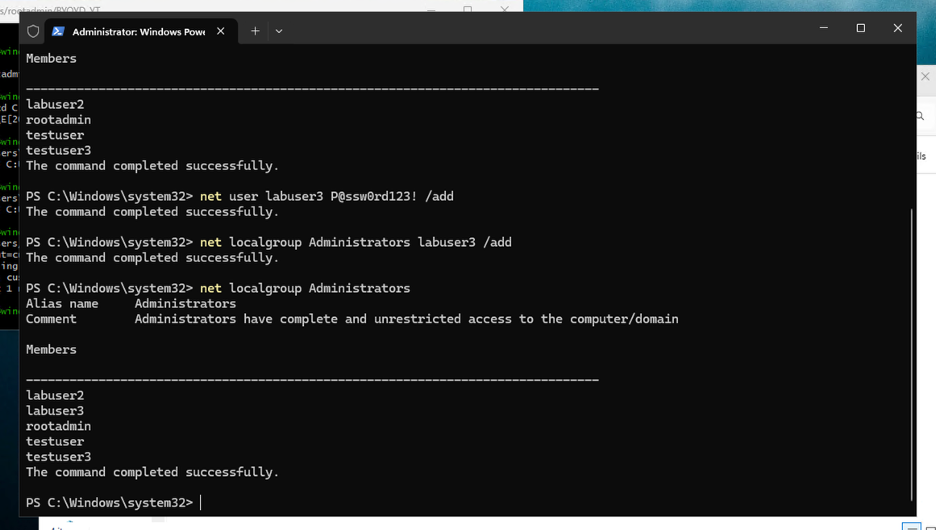
More importantly, when the driver begins degrading Sophos and terminating its services, the SIEM no longer treats it as background instability. The repeated service termination events are elevated and visible without dropping down into low-severity views. That is the core outcome. The attack did not change. The environment did. Detection logic was aligned with control impact.
Instead of reacting to raw event IDs, the rules now reflect business-relevant control dependencies—identity boundaries and endpoint protection health.
Conclusion
Out-of-the-box telemetry is not enough. You must tune detections around what actually matters: authentication boundaries, privilege escalation, driver loads, and security control degradation. Once that tuning is in place, the same lab activity that previously hid in level 5 noise becomes immediately visible in a high-severity operational lens. That is the difference between collecting logs and engineering detection.